
7.1 — Enable Copilot Code Review settings
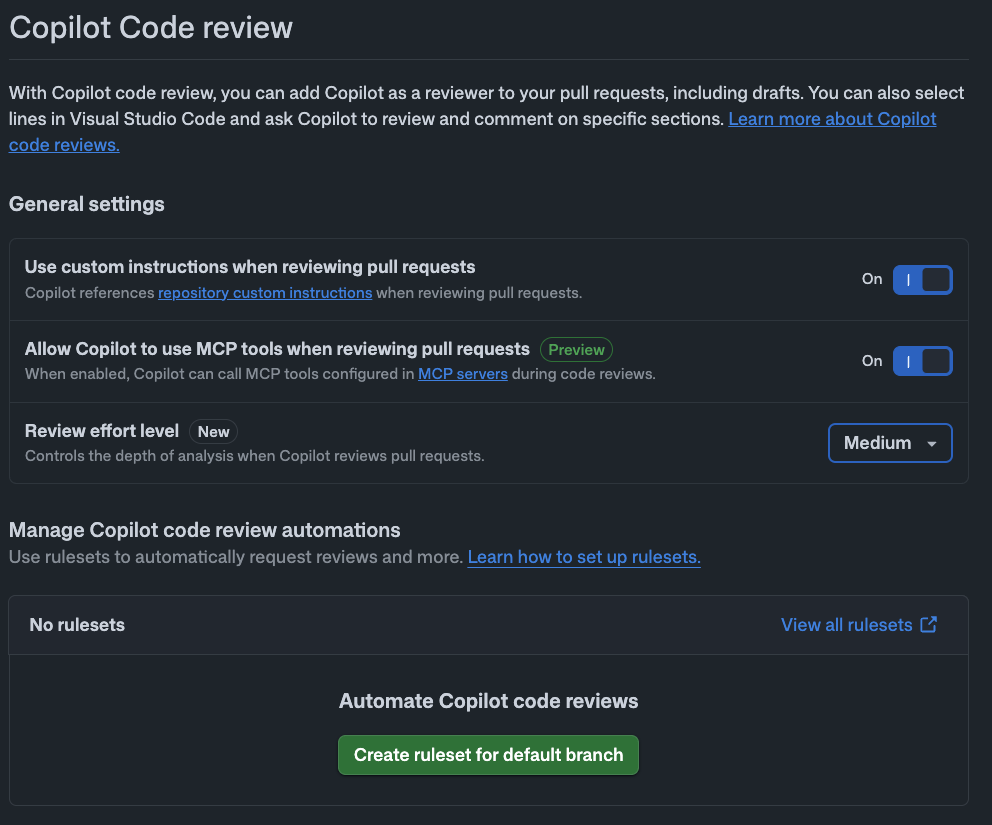
First, head over to github.com, open your repository and check the Copilot Code Review settings.
- Repository Settings → Copilot → Code review
- Enable the following:
- Use custom instructions when reviewing pull requests → On
7.2 — Create a Ruleset for automatic review
On the same page, in the Manage Copilot code review automations section, just click Create ruleset for default branch. That's it — Copilot Code Review will now fire automatically on every PR targeting the default branch (main).
Once that's set, head back to Step 6.4 and wait for Copilot to finish implementing.
7.3 — Check the results on Copilot's PR
When Copilot finishes implementing in Step 6.4, it opens a PR automatically. The Ruleset you created in 7.2 fires the moment that PR opens, kicking off Copilot Code Review (⏱ about 5 minutes):
- ✅ Pull Request Overview — a summary comment for the whole PR
- ✅ Code suggestions — concrete change proposals on individual files
7.4 — Apply the review suggestions
There are two ways to apply Copilot's review suggestions:
- Commit suggestion — commit individual suggestions one at a time
- Fix batch with Copilot — fix all suggestions in one go (recommended)
Clicking Fix batch with Copilot automatically opens a new PR with the fixes (⏱ about 15 minutes).
- First, merge the new PR with the fixes
- Then, merge the original PR