
In a nutshell
GitHub Actions is a continuous integration and continuous delivery (CI/CD) platform.
But it goes beyond just DevOps: run workflows when any event happens in your repository — push, PR, issue, label, schedule, and more. It's automation for almost anything.
What workflow does it automate?
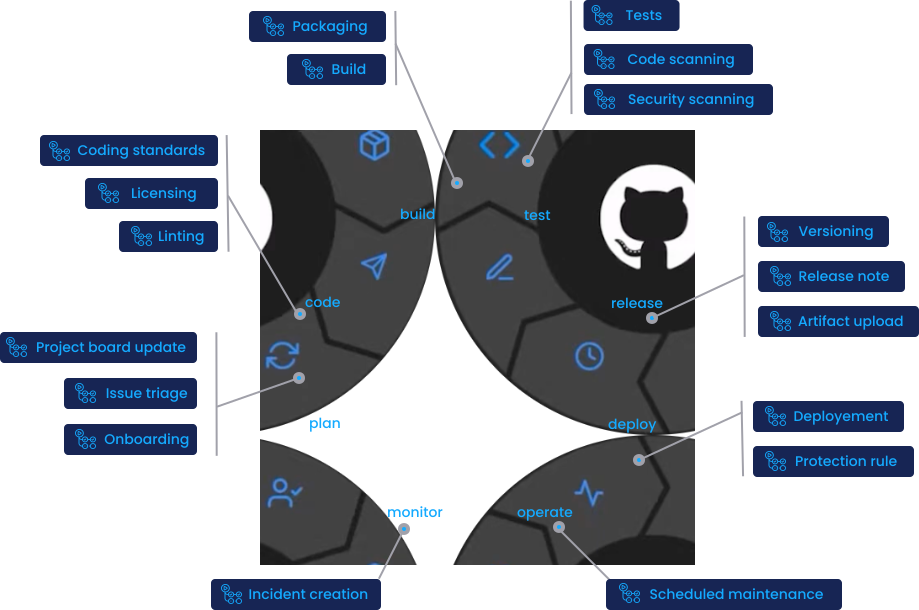
Beyond CI/CD, GitHub Actions can automate every stage of the SDLC, all triggered by events.
The metrics it improves (DORA)
The point of automation (CI/CD, tests, reviews) is to raise both speed and stability. The yardstick is the four DORA metrics ↗ — push them toward Elite.
| DORA metric | 🟢 Elite | 🟣 High | 🟠 Medium | 🔴 Low |
|---|---|---|---|---|
| 🚀 Deployment frequency | Multiple per day | Daily–weekly | Weekly–monthly | Every 1–6 months |
| ⏱️ Lead time for changes | < 1 day | 1 day–1 week | 1 week–1 month | 1–6 months |
| ❌ Change failure rate | 0–15% | 0–15% | 0–15% | 46–60% |
| 🔧 Mean time to recovery | < 1 hour | < 1 day | < 1 day | 1 week–1 month |
🎯 Automation’s value: raise speed (frequency, lead time) and stability (failure rate, recovery) at the same time.
Architecture: clone → run → destroy
Your GitHub repo is cloned onto a disposable cloud VM; steps (like tests) run there, results are sent back, and the VM is destroyed.
flowchart LR
REPO["🐙 GitHub<br/>📦 Repository"]
VM["☁️ Runner VM<br/>fresh & disposable"]
RUN["▶️ Run steps<br/>✅ test · 🏗️ build"]
GONE["💥 VM destroyed"]
REPO -->|① event triggers| VM
VM -->|② clone repo| RUN
RUN -->|③ send results back| REPO
RUN -->|④ job ends| GONE
classDef gh fill:#0a0e27,stroke:#00f0ff,color:#00f0ff,stroke-width:2px
classDef vm fill:#1a0a2e,stroke:#ffb000,color:#ffb000,stroke-width:2px
classDef run fill:#0a1a14,stroke:#9bbc0f,color:#9bbc0f,stroke-width:2px
classDef gone fill:#2a0a0a,stroke:#ff5555,color:#ff5555,stroke-width:2px
class REPO gh
class VM vm
class RUN run
class GONE gone🔁 Results return as checks, logs, and artifacts; the VM is discarded every run.
How it works (core concepts)
It’s very simple: when an event fires, borrow a clean VM, clone the repo, and run the steps you wrote — in order.
- 📁 Location —
.github/workflows/*.yml(multiple files supported) - ⚡ Triggers —
push/pull_request/schedule(cron) /workflow_dispatch(manual) /issues/releaseand 35+ other events - 🖥️ Execution environment — a fresh GitHub-hosted runner (Linux / Windows / macOS VM) starts up per job
- 📦 Repo cloned every time —
actions/checkoutfull-clones into$GITHUB_WORKSPACE(no state carried over from previous jobs) - ⏱️ Time limits — 6 hours max per job, 35 days max per workflow (matrix parallelism is supported)
- �� Secrets — stored in
Settings → Secrets→ referenced as${{ secrets.NAME }}(masked in logs)
🧠 “Start from scratch every time” is the golden rule of GitHub Actions. To persist state, use
actions/cache, artifacts, or rely on already-deployed infrastructure.
GitHub-hosted runners vs Self-hosted runners
| Aspect | 🟢 GitHub-hosted runner | 🛠️ Self-hosted runner |
|---|---|---|
| Management | GitHub provides, updates, and discards | You run it on your own server / VM / k8s |
| OS | Linux / Windows / macOS | Anything (Raspberry Pi, on-prem LAN, GPU machines) |
| Network | Public internet | Direct access to internal networks / VPN resources |
| Scale | Auto-starts on demand, unlimited parallelism (within plan limits) | You manage capacity |
| Cost | Time-based billing (see table below) | Runner itself is free (just your own infra costs) |
| Use case | General CI/CD, OSS, lightweight jobs | Dedicated hardware, internal resource access, sensitive workloads, huge builds |
🌐 As a middle ground, consider larger runners (high-spec GitHub-hosted) or Actions Runner Controller to run auto-scaling self-hosted runners on k8s.
Reuse components from the Marketplace
You don’t have to write everything from scratch. GitHub Marketplace has 20,000+ reusable actions.
steps:
  - uses: actions/checkout@v4              # GitHub official: clone repo
  - uses: actions/setup-node@v4            # Set up Node.js environment
    with: { node-version: 20 }
  - uses: docker/build-push-action@v5      # Build & push Docker image
- uses: aws-actions/configure-aws-credentials@v4- 🏷️ Official verified actions — GitHub, AWS, Azure, GCP, Docker, HashiCorp, and other major vendors
- 🔓 OSS actions — anyone can publish (
uses: owner/repo@shato reference) - 📌 Always pin versions — commit SHA pins are safer than tags (
@v4) against supply chain attacks - 🛡️ Org allowlist — restrict available actions via
Settings → Actions → Allowed actions
Getting started (fastest path)
Just drop a .github/workflows/ci.yml:
name: CI
on:
  push:        { branches: [main] }
  pull_request:
jobs:
  test:
    runs-on: ubuntu-latest
    steps:
      - uses: actions/checkout@v4
      - uses: actions/setup-node@v4
        with: { node-version: 20 }
      - run: npm ci
      - run: npm test
The moment you push, execution logs appear in the Actions tab. Failures show as ❌ on the PR.
🚀 Start with
runs-on: ubuntu-latestfor everything, then scale out to Windows / macOS / larger runners / self-hosted as needed.
Eligibility and pricing
Public repos get GitHub-hosted runners completely free — only concurrency limits apply. Private repos get a monthly free tier per plan; overages are pay-as-you-go.
Free tier per plan (private repos / month)
| Plan | Actions minutes / month | Storage |
|---|---|---|
| Free | 2,000 min | 500 MB |
| Pro | 3,000 min | 1 GB |
| Team | 3,000 min | 2 GB |
| Enterprise | 50,000 min | 50 GB |
💡 Free tier counts Linux as 1× multiplier. Windows consumes 2× and macOS consumes 10× — watch out.
Per-OS / per-size unit pricing (overages · 2-core standard)
| OS / Runner | Multiplier | Unit price (USD/min) | Notes |
|---|---|---|---|
| Linux 2-core | 1× | $0.008 | Standard, cheapest |
| Windows 2-core | 2× | $0.016 | 2× Linux |
| macOS 3-core | 10× | $0.08 | iOS / Mac builds |
| Linux 4-core (larger) | — | $0.016 | Team / Enterprise |
| Linux 8-core (larger) | — | $0.032 | |
| Linux 16-core (larger) | — | $0.064 | |
| Linux 64-core (larger) | — | $0.256 | Huge builds |
| GPU runner | — | $0.07+ | ML / inference |
💰 Storage overages are $0.25 / GB (artifacts + Actions cache + Packages combined).
🛠️ Self-hosted runners incur no GitHub billing (as of now). Running on your own server / k8s means execution time is free — you just pay for your own infrastructure and electricity.
🌍 Billing is usage-time-based, not per active committer. Even a solo developer who runs CI heavily will see charges.
Your CI is not the only thing burning minutes 📖 Docs
Alongside the CI/CD you wrote yourself, the headline Copilot and GHAS features run on the same GitHub-hosted runners and turn the same Actions meter.
| What spends Actions minutes | How it is billed |
|---|---|
| 🤖 Cloud Agent | Every task it implements |
| 👀 Copilot Code Review | Every review on a private repo |
| 🔍 Code Scanning (CodeQL) | Every push, PR and weekly scan |
| 🩺 Code Quality | Every scan it runs |
| ⚙️ Your own CI/CD | Whatever your workflows do |
A hard budget stops all of it at once
Exhaust a budget that has Stop usage when budget limit is reached ticked and every GitHub-hosted runner halts. It is not just CI going red: CodeQL scanning and Copilot stop in the same instant.
- ✅ Prefer alert-only — leave the box unticked for a “soft budget”. Owners and billing managers are emailed at 75 / 90 / 100% and nothing is blocked
- 📊 Measure before you cap —
github.com/enterprises/<enterprise slug>/actions/metrics/usagebreaks minutes down by workflow, repo and OS - 🛠️ Self-hosted runners are not billed — the problem never arises there